티스토리 뷰
[map merging] feature matching
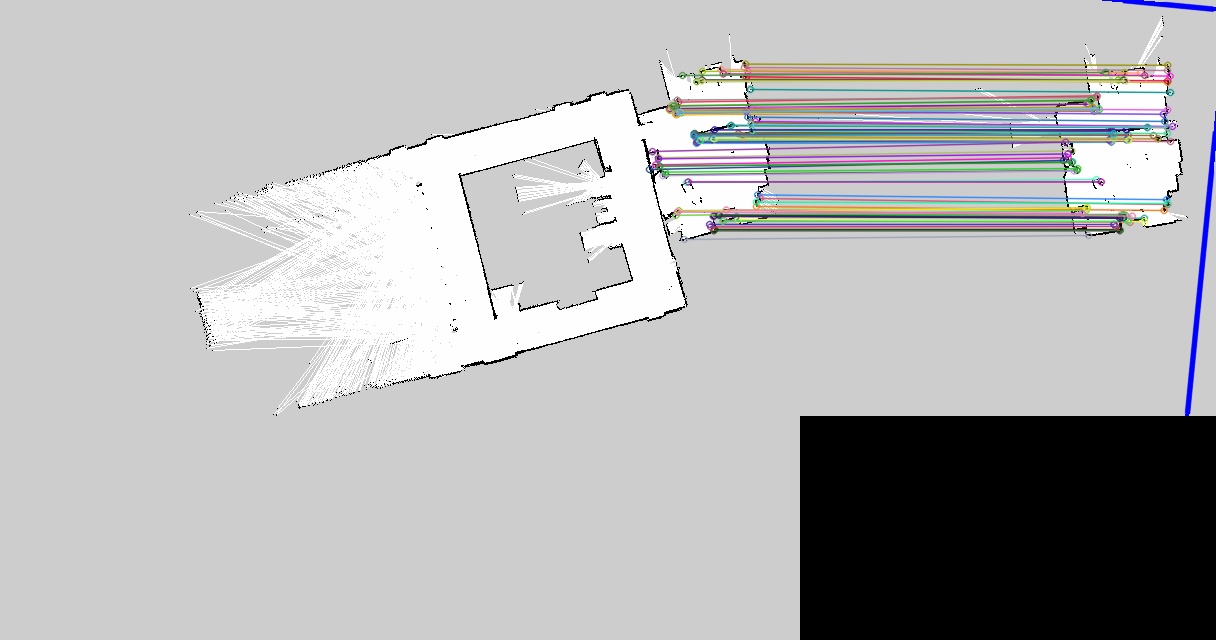
한 50~60% 유사도를 가진 map을 새로 따서 feature matching을 시도
[참고 블로그]
https://bkshin.tistory.com/entry/OpenCV-29-%EC%98%AC%EB%B0%94%EB%A5%B8-%EB%A7%A4%EC%B9%AD%EC%A0%90-%EC%B0%BE%EA%B8%B0?category=1148027
사용한 descriptor는 ORB이다.

distance ratio는 0.6으로 설정
- 많은 매칭이 되지 않았다. 제일 위에 있는 보라색 매칭 말고는 잘 매칭이 된 걸 볼 수 있다.
ORB descriptor 코드
import cv2
import numpy as np
from matplotlib import pyplot as plt

img1 = cv2.imread('lab.pgm')
img2 = cv2.imread('lab2.pgm')

cv2.imshow('lab',img1)
cv2.imshow("lab2",img2)

detector = cv2.ORB_create()

kp1, des1 = detector.detectAndCompute(img1,None)
kp2, des2 = detector.detectAndCompute(img2,None)

bf = cv2.BFMatcher()
matches= bf.knnMatch(des1,des2,k=2)

good = []
for m,n in matches:
    if m.distance < 0.6*n.distance:
        good.append([m])

img3 = cv2.drawMatchesKnn(img1,kp1,img2,kp2,good,None,flags=2)

cv2.imshow("matching",img3),plt.show()
cv2.imwrite('matching.jpg',img3)
cv2.waitKey(0)
ransac을 이용해 좋은 매칭만 가져오기

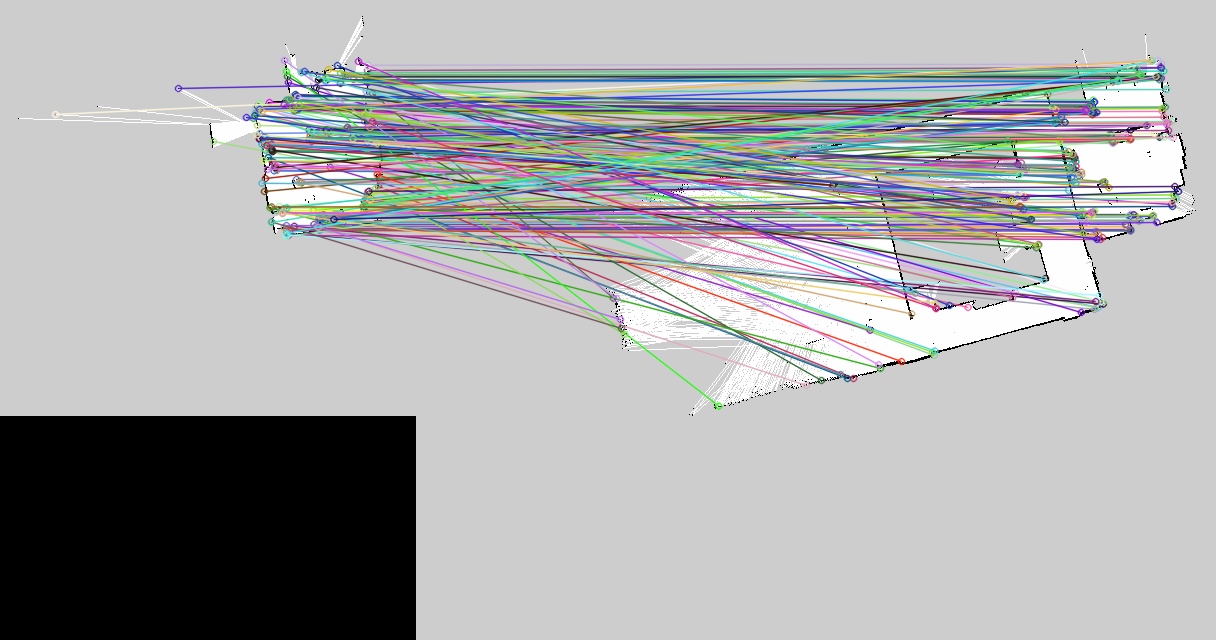
outlier를 거르지 않은 모든 매칭 결과를 표시한 것이다.
ransac을 통해 골라낸 매칭이다.
mtrx, mask = cv2.findHomography(srcPoints, dstPoints, method, ransacReprojThreshold, mask, maxIters, confidence)
method=0(optional): 근사 계산 알고리즘 선택 (0: 모든 점으로 최소 제곱 오차 계산, cv2.RANSAC, cv2.LMEDS, cv2.RHO)
매칭 되는 물체를 찾아서 그 물체의 원근 변환 행렬을 구해 그 행렬과 맞지 않는 매칭점을 제거할 수 있게 된다.

ORB descriptor & RANSAC 코드
import cv2
import numpy as np
from matplotlib import pyplot as plt

img1 = cv2.imread('lab2.pgm')
img2 = cv2.imread('lab.pgm')

cv2.imshow('lab',img1)
cv2.imshow("lab2",img2)

detector = cv2.ORB_create()

kp1, des1 = detector.detectAndCompute(img1,None)
kp2, des2 = detector.detectAndCompute(img2,None)

matcher = cv2.BFMatcher(cv2.NORM_HAMMING, crossCheck=True)
matches = matcher.match(des1, des2)

matches = sorted(matches, key=lambda x:x.distance)

res1 = cv2.drawMatches(img1, kp1, img2, kp2, matches, None, \
                    flags=cv2.DRAW_MATCHES_FLAGS_NOT_DRAW_SINGLE_POINTS)

src_pts = np.float32([ kp1[m.queryIdx].pt for m in matches ])
dst_pts = np.float32([ kp2[m.trainIdx].pt for m in matches ])

mtrx, mask = cv2.findHomography(src_pts, dst_pts, cv2.RANSAC, 5.0)
h,w = img1.shape[:2]
pts = np.float32([ [[0,0]],[[0,h-1]],[[w-1,h-1]],[[w-1,0]] ])
dst = cv2.perspectiveTransform(pts,mtrx)
img2 = cv2.polylines(img2,[np.int32(dst)],True,255,3, cv2.LINE_AA)

matchesMask = mask.ravel().tolist()
res2 = cv2.drawMatches(img1, kp1, img2, kp2, matches, None, \
                    matchesMask = matchesMask,
                    flags=cv2.DRAW_MATCHES_FLAGS_NOT_DRAW_SINGLE_POINTS)

accuracy=float(mask.sum()) / mask.size
print("accuracy: %d/%d(%.2f%%)"% (mask.sum(), mask.size, accuracy))

cv2.imshow('Matching-All', res1)
cv2.imwrite('matching-all.jpg',res1)
cv2.imshow('Matching-Inlier ', res2)
cv2.imwrite('matching-inlier.jpg',res2)
cv2.waitKey()
cv2.destroyAllWindows()
이런 매칭 결과로 파노라마까지 진행해 map merging을 도전할 예정
생각보다 랩실이 특징점이 많이 나오는 것 같다.
'robot' 카테고리의 다른 글
| [map merging] 맵 합치기 (0) | 2021.07.21 |
|---|---|
| [map merging] 파노라마 stitiching (0) | 2021.07.19 |
| [gmapping map size] 맵 사이즈 변경 (0) | 2021.07.12 |
| [kobuki] 내비게이션 파라미터 조정 (0) | 2021.07.05 |
| [꼬부기/kobuki] navigation (0) | 2021.06.25 |
댓글
공지사항
최근에 올라온 글
최근에 달린 댓글
- Total
- Today
- Yesterday
링크
TAG
- 티스토리 코드블럭
- 텐서플로우 #tensorflow # tensor #텐서 #flow #플로우
- 빈 txt
- diagrams.net
- 백준
- rosbag
- #전기버스
- 꺼저
- 파일 올리기
- 으에엑
- 버튼에 메뉴만들기
- 표처럼 코드가 나와요
- c#
- 6204
- cartographer
- 2163번
- lwip
- 4831
- 버튼 클릭 시 메뉴
- 네트워크 구성도
- 재생목록
- 10869
- 내 몸에서
- WPF
- SWEA
- gmapping
- 어이구 두야
- add button
- wpf 재생목록
- 2588
| 일 | 월 | 화 | 수 | 목 | 금 | 토 |
|---|---|---|---|---|---|---|
| 1 | 2 | 3 | 4 | 5 | 6 | 7 |
| 8 | 9 | 10 | 11 | 12 | 13 | 14 |
| 15 | 16 | 17 | 18 | 19 | 20 | 21 |
| 22 | 23 | 24 | 25 | 26 | 27 | 28 |
글 보관함